

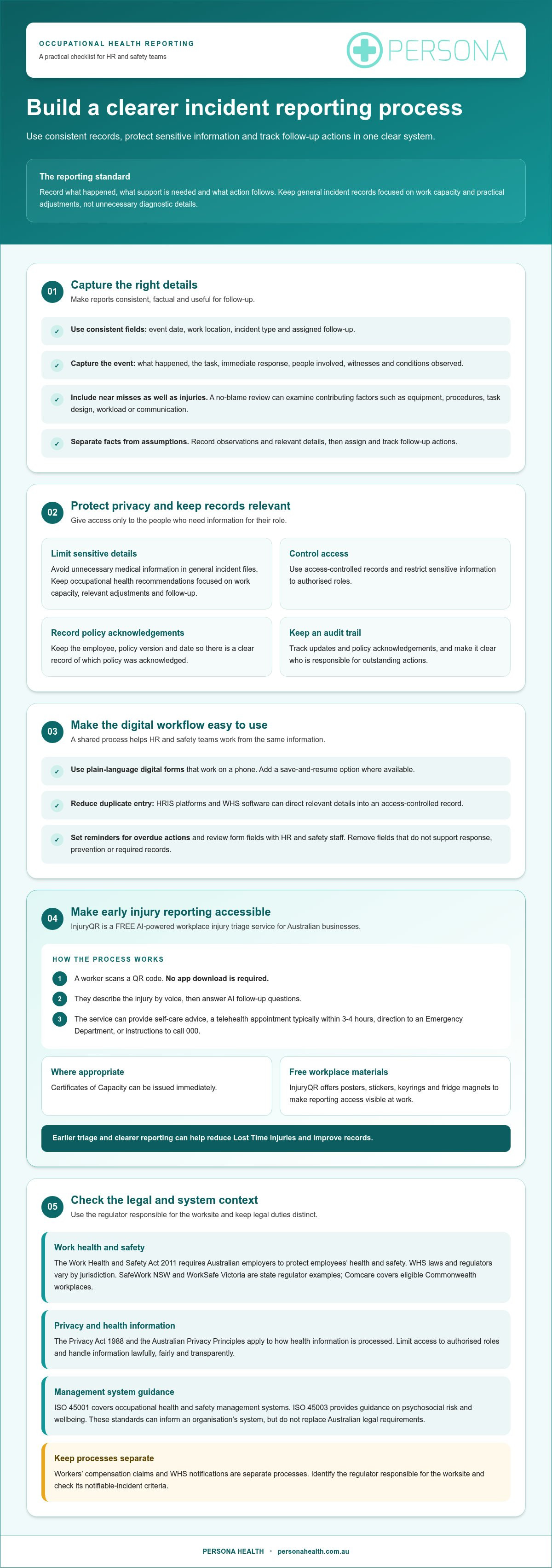
Better occupational health reporting starts with a consistent process, not more paperwork. To make occupational health reporting easier for HR managers, use standardised, privacy-aware templates and record incidents, safety activities and follow-up actions in one clear system. Focus reports on an employee’s work capacity and practical adjustments, rather than unnecessary diagnostic details.
It’s understandable if records currently sit across emails, spreadsheets and different team processes. When information is inconsistent or hard to find, it can be more difficult to see what happened, what support is needed and whether agreed actions have been completed. A clear reporting approach helps HR and safety teams work from the same information while respecting employee privacy.
Consistent templates, timely incident reporting and useful dashboards can simplify the process. Document recommendations, identify recurring issues and turn reporting into practical workplace improvements. The aim is a process that is easier to manage and more useful to everyone who relies on it.
Key Takeaways
- Use consistent, privacy-aware reporting templates so HR and safety teams can record information clearly and compare trends across teams and work locations.
- Make early incident reporting easier with InjuryQR, a free AI-powered triage service for Australian businesses: workers scan a QR code without downloading an app, describe an injury by voice and answer AI follow-up questions. It can offer self-care advice, telehealth typically within 3-4 hours, Emergency Department direction or instructions to call 000; Certificates of Capacity can be issued immediately where appropriate, supporting better reporting and fewer Lost Time Injuries.
- Keep incident records useful by documenting what happened, investigating underlying causes and tracking actions to help prevent a repeat.
- Bring HR and HSE data together in privacy-conscious dashboards, then review indicators monthly to guide practical changes to workplace controls.
- Record how managers respond to occupational health recommendations, focusing on work capacity, relevant adjustments and clear follow-up rather than unnecessary medical detail.
Digital incident reporting and policy acknowledgements
Digital forms, privacy controls and consistent policy records help HR manage occupational health information. A shared process also makes it easier to spot incomplete reports and track follow-up.
The Work Health and Safety Act 2011 requires Australian employers to protect employees’ health and safety, according to the Australian Government Federal Register of Legislation. WHS laws and regulators vary by jurisdiction. SafeWork NSW and WorkSafe Victoria are examples of state regulators, while Comcare covers eligible Commonwealth workplaces. Employers should use the regulator responsible for the worksite when determining whether an incident is notifiable.
ISO 45001 is a standard for occupational health and safety management systems, and ISO 45003 is guidance for psychosocial risk and wellbeing, according to the International Organization for Standardization. These standards can inform an organisation’s system, but do not replace Australian legal requirements.
The Privacy Act 1988 and the Australian Privacy Principles require health information in Australia to be processed lawfully, fairly and transparently, according to the Australian Government Federal Register of Legislation. Limit access to authorised roles, and record policy acknowledgements by employee, policy version and date. This creates a clear record of which policy was acknowledged.
Digital forms and no-blame reviews
A digital incident form captures consistent details, while a no-blame review examines contributing factors rather than assigning fault. Include fields for the event, location, task, immediate response, witnesses and follow-up actions. Let employees report near misses as well as injuries. These details can help HR identify process or equipment issues that need attention.
InjuryQR is a FREE AI-powered workplace injury triage service available to all Australian businesses. Workers scan a QR code without downloading an app, describe the injury by voice, and answer AI follow-up questions. It can provide self-care advice, telehealth appointments typically within 3-4 hours, direction to an Emergency Department or instructions to call 000. Certificates of Capacity can be issued immediately where appropriate. InjuryQR also offers free posters, stickers, keyrings and fridge magnets to make reporting access visible at work. Earlier triage and clearer reporting can help reduce Lost Time Injuries and improve records.
Streamlining reports with workplace software
Digital forms, HRIS platforms and WHS software can reduce duplicate entry by directing relevant details into an access-controlled record. Set required fields for the event date, work location, incident type and assigned follow-up. Use reminders for overdue actions, and keep a clear audit trail of updates and policy acknowledgements.
Make forms usable on a phone, with plain-language prompts and a save-and-resume option where available. Review each field with HR and safety staff, removing information that does not support response, prevention or required records. For help discussing reporting processes, contact Persona Health.
Incident reporting and investigation
Respond promptly to each workplace injury, hazard or near miss, then document what happened and the action taken. Keep the record factual, consistent and accessible to the people responsible for follow-up. Look beyond the immediate event to contributing factors such as equipment, task design, workload or communication.
For workers’ compensation, record the employee’s account, injury details, relevant work information and follow-up actions. Then follow the claims process for the relevant state or territory. Report notifiable incidents to the WHS regulator responsible for the incident location, in line with that jurisdiction’s requirements.
Jurisdiction matters. SafeWork NSW, WorkSafe Victoria and other state or territory regulators administer workplace safety in their respective areas, while Comcare covers eligible Commonwealth workplaces. Identify the regulator responsible for the worksite and whether the event meets its notifiable-incident criteria. Workers’ compensation claims and WHS notifications are separate processes, so completing one does not automatically complete the other.
Common reporting mistakes include delaying the initial record, omitting witnesses, mixing assumptions with observed facts and failing to assign follow-up actions. For example, “employee slipped near loading bay” is less useful than recording the location, floor condition, task, available photographs and immediate response. Avoid putting unnecessary medical details in a general incident file. Restrict sensitive information to people who need it for their role.
A practical investigation follows a documented sequence:
- Stabilise the situation: address immediate danger and arrange appropriate assistance for the injured employee.
- Capture the event: record the time, location, task, people involved, witnesses and conditions observed.
- Identify contributing factors: examine hazards, procedures, equipment, training and work pressures without assuming blame.
- Assign corrective actions: name a responsible role, record the change required and track completion.
- Review the outcome: check whether the control addressed the cause and share relevant learning with the team.
A no-blame approach supports honest accounts, including reports of mental strain or near misses. It does not remove accountability for completing agreed safety actions. InjuryQR, introduced earlier, can support early injury triage and reporting; link its record to the organisation’s follow-up process without duplicating sensitive details.
Use one incident reference across HR and safety records, so teams can connect the event, claim updates and corrective actions. For guidance on structuring workplace reporting processes, contact the occupational health team.
Early reporting and rapid triage
Early reporting gives HR a clearer view of an employee’s needs before a minor concern becomes harder to manage. A prompt, structured response also helps distinguish immediate safety issues from requests for work adjustments or further assessment. For example, a worker reporting discomfort after repetitive tasks may need an initial conversation, a review of duties and documented follow-up, rather than an automatic referral.
Make reporting straightforward where the concern arises. Provide one clear route for employees and supervisors, such as a digital form, phone contact or QR-based reporting option. Ask about the event or symptom, when it began, the tasks involved, any immediate risk and the support requested. Keep questions focused on work impact, not an assumed diagnosis.
When a report arrives, assess urgency before deciding what happens next. Check for immediate safety concerns, whether the employee can continue their duties safely and whether a manager needs to arrange temporary changes. If an employee describes a serious or rapidly worsening issue, direct them to appropriate urgent care rather than treating an HR form as a clinical assessment.
A brief discussion with occupational health can clarify the question HR needs answered and may prevent unnecessary referrals or shorten appointment waiting times. Explain the work context, relevant tasks and the decision required. For instance, HR might ask whether modified duties could be considered, rather than requesting broad medical details. The employee’s consent and privacy should remain central when arranging an assessment or sharing health information.
Build a triage pathway with clear hand-offs. Each report should show who reviews it, who contacts the employee, what action follows and where the decision is recorded. Statuses such as “received”, “review underway” or “action assigned” help HR spot stalled cases. Set review expectations according to urgency, and tell employees how to raise a concern if their condition changes.
- Acknowledge: confirm the report reached the responsible HR or safety contact.
- Assess immediate risk: consider the task, environment and employee’s stated work impact.
- Choose a proportionate response: consider practical adjustments, occupational health input or urgent care.
- Record and follow up: document the decision, responsible person and next review point.
Digital triage tools can support early injury reporting by guiding workers through prompts and directing them to suitable next steps. Keep the outputs within your organisation’s established response process, and record relevant work actions separately from sensitive clinical information. A consistent pathway can help protect productivity while supporting an employee experiencing pain, illness or stress.
After implementation, review actual reports with HR and safety staff. Check whether employees knew where to report, whether follow-up was assigned and whether the response matched the concern. Clarify questions or hand-offs that caused confusion so future reports reach the right person promptly.
HR and HSE dashboards
A shared dashboard helps HR and HSE teams interpret occupational health information together. Track consistent indicators, protect personal details and use the results to guide workplace controls.
Australian employers can track reporting metrics using aggregated, privacy-conscious information alongside clear records of actions and outcomes. Prepare for audits by documenting how data was collected, reviewed and used, while restricting access to identifiable health information.
Tracking reporting metrics
An HR and HSE dashboard brings selected occupational health indicators into one view, helping teams identify patterns and monitor follow-up. Useful measures include incident types, hazard reports, overdue corrective actions, referrals and completed safety inspections. Define each measure consistently, including its reporting period and calculation method, so comparisons across teams are meaningful.
Review the indicators monthly and adjust controls based on the results. For example, a rise in reports linked to a particular task can prompt a review of its equipment, training or work design. Safe Work Australia’s measurement protocol calculates the total injury rate per 1,000,000 hours worked. If a rate uses 200,000 hours as its denominator, state that denominator clearly.
Preparing reporting records for audits
Audit-ready records show what was documented, who reviewed it and which actions followed. Keep consistent records of incident reports, inspections, safety sessions, policy acknowledgements and corrective-action decisions. Include dates, responsible roles and document versions so an auditor can follow the sequence without relying on staff memory.
Use a controlled process for corrections. Preserve the original entry, record the amendment and identify who made it. Before an audit, HR and HSE can review missing fields, open actions and referral outcomes. Share aggregated information where possible, rather than exposing unnecessary employee health details.
Build the dashboard around decisions, not the volume of data collected. A high report count alone cannot show whether risk is improving. Pair activity measures, such as inspections completed, with outcome measures, such as recurring hazards or actions still open. Show the reporting period, data source and definition alongside each indicator.
Keep separate dashboard views for executives, operational managers and HR staff. Executives may need organisation-wide trends, while a site manager needs local hazards and assigned actions. HR may need referral progress and suitable work adjustments, without access to unrelated clinical information. Role-based access and aggregated reporting help maintain that distinction.
At each monthly review, record the decision, accountable role and follow-up date. If reports show repeated manual-handling concerns in one work area, document the selected control and when its effectiveness will be reviewed. Link meeting notes to the relevant dashboard period, not unnecessary personal records.
For an audit, prepare a clear evidence trail: the measure’s definition, source records, review notes and action status. Check that totals use the same time period and denominator. When InjuryQR supports injury reporting, align relevant operational records with the dashboard while keeping sensitive clinical details appropriately restricted.
How managers and HR use occupational health recommendations
Occupational health recommendations help HR and managers translate professional advice into practical workplace decisions. Focus on the employee’s functional capacity, work impact and possible reasonable adjustments, rather than seeking a diagnosis. Consider the role’s essential tasks and the specific question raised in the referral.
An occupational health assessment is a confidential medical review by a qualified occupational health professional. It provides expert advice, not treatment. The report should address the referral question and offer practical guidance relevant to work. For example, it may explain whether an employee can safely perform particular duties without including unrelated clinical history.
Before making a referral, agree on the decision that needs support. Give the occupational health professional relevant information about the role, tasks and workplace conditions. A focused question, such as whether duties could be modified, helps keep the assessment useful. Managers can also request general advice using an anonymised scenario when they need guidance without identifying an employee.
When recommendations arrive, HR and the manager can consider the following:
- Relate advice to the role: compare recommendations with the employee’s actual duties and relevant work risks.
- Discuss workable options: consider changes to tasks, schedules, equipment or work arrangements with the employee.
- Record the decision: note which recommendations were adopted, adapted or not followed, and the reasons.
- Set a review point: agree who will follow up and how the team will assess whether adjustments are working.
If a recommendation is unclear, ask occupational health to explain its practical meaning, such as what a suggested adjustment could involve. Keep the discussion focused on the report’s wording and work implications, not requests for additional private details about the employee or consultation.
Share only the work-related guidance a manager needs to put agreed changes into practice. For instance, a supervisor may need to know that an employee should temporarily avoid a particular task, but not the clinical reason. Keep the report available to authorised roles, and record implementation separately from clinical details.
Where a recommendation cannot be implemented as written, document the workplace factors considered and the alternative action chosen. If HR needs help shaping an appropriate referral or understanding how recommendations can inform work decisions, it can discuss the reporting process with the occupational health team.
Employers should document their response to occupational health recommendations, including whether advice was adopted, adapted or not followed, and why. Occupational health advice is advisory. UK managers decide whether and how to use and implement it.
Occupational health may advise that an employee is unfit for work or particular duties because of a safety issue, without disclosing why. Managers and HR can ask occupational health to clarify what a report says, such as its suggested adjustments, but it will not provide extra information about the employee or consultation.
Persona Health: Pre-Employment Medicals
Persona Health’s Pre-Employment Medicals help employers assess candidates against role requirements. Its employer-focused approach, responsive customer service and fast turnaround times support clear recruitment decisions. For workplace injury matters, Workplace Injury Management can support structured follow-up, while Crystalline Silica Medicals address relevant exposure-related assessment needs.
Persona Health has dedicated clinics located across Sydney, Melbourne, Gregory Hills and Parramatta. Its established local network ensures accessible, high-quality occupational health services and tailored mobile workplace assessments throughout these key metropolitan regions.
To discuss an assessment or workplace health need, contact Persona Health.
Build a reporting process that supports better decisions
Improvement does not require a complete system overhaul. Choose one point where information regularly stalls, such as an unclear referral, an overdue action or a gap between HR and safety records. Agree who owns that step, what information they need and how the outcome will be recorded. A focused change gives your team a practical way to make occupational health reporting easier for HR managers while keeping employee needs in view.
When external occupational health support is useful, Persona Health provides Pre-Employment Medicals, Workplace Injury Management and Crystalline Silica Medicals. These services support recruitment assessments, workplace injury processes and health monitoring relevant to silica exposure. Keep the purpose of each referral clear, and connect any resulting recommendations to the work decision HR needs to make.
A well-organised process improves through steady review and clear ownership. Take the next step at a pace that fits your workplace and reporting needs.
Discuss your occupational health reporting needs
With a clear next step, HR can make reporting more manageable and keep attention on people and practical workplace decisions.
Frequently Asked Questions
What are the steps for creating an efficient workplace injury and illness reporting process?
Set one clear reporting route, then explain it during induction and display it where employees work. Ask reporters to record when and where an injury or illness arose, the task involved, immediate concerns and assistance needed. Assign a named role to review each report, arrange urgent support when required, and track follow-up actions to completion. Include InjuryQR as an accessible triage option, and periodically test the process with a realistic scenario, such as an illness reported during a shift.
What occupational health reporting software is available in Australia, and how do features and prices compare?
InjuryQR is a free AI-powered workplace injury triage service: workers report by QR code without downloading an app, and it can provide self-care advice, telehealth, urgent-care direction and Certificates of Capacity where appropriate. The article also mentions digital forms, HRIS platforms and WHS software, but gives no prices or feature-by-feature comparison for them.

Article by
Ian Nicholson
Ian is the Business Support Manager at Persona Health, where he plays a key role across IT, sales, marketing and business operations. With a broad skill set and a practical, solutions-focused approach, Ian helps drive the systems, communication and commercial strategy that support Persona Health’s continued growth across Australia.